
The following R-script is to download the data automatically from Twitter using the package SchedulerR. As first step we download the data using the OAuth protocol and store the data using as a name the date from the download. As second we used the package SchedulerR for to specify how long the script runs. This package has the advantage that we can set the time and also how long will repeat either daily, weekly or monthly.
Load the packages:
library(twitteR)
library(httr)
library(SchedulerR)
Also we choose the directory where the RData would be saved:
setwd("C:/Users/Documents/schedulerR")
OAuth protocol:
api_key <- "xxxxxxxxxxxxxxxxxxxxxx"
api_secret <- "xxxxxxxxxxxxxxxxxxxxxxxxxxxxxxxxxx"
access_token <- "xxxxxxxxxxxxxxxxxxxxxxxxxxxxxxxx"
access_token_secret <- "xxxxxxxxxxxxxxxxxxxxxxxxxxxxxxxxxxxxxx"
setup_twitter_oauth(api_key,api_secret,access_token,access_token_secret)
Extract the tweets using usertimeline function from the Twitter R package:
 clinton_tweets <- userTimeline("HillaryClinton", n = 3200)
tweetsc.df <- twListToDF(clinton_tweets)
dim(tweetsc.df)
Create a variable called date and become to character:
date<-Sys.Date()
date<-as.character(date)
name<-paste(date,".RData")
#Finally we save the Rdata using as name the date from the download
save(tweetsc.df, file =name)
The script above is to download the data from Twitter. The next step is to use the package SchedulerR::
taskscheduler_create(taskname = "taskclinton", rscript = clintontweets,
  schedule = "DAILY", starttime = "11:30", startdate = format(Sys.Date(), "%d/%m/%Y"))
Examples of Analysis
We can implement many analysis from text data.
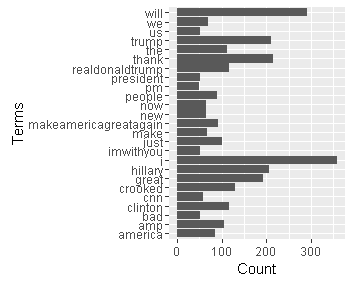
Find words common with a minimun frequency of 45:
term.freq <- rowSums(as.matrix(tdm))
term.freq = 45)
#we saved the data in a data frame
df <- data.frame(term = names(term.freq), freq = term.freq)
save(df,file="tqfclinton50.RData")
#plot with ggplot2
library(ggplot2)
ggplot(df, aes(x = term, y = freq)) + geom_bar(stat = "identity") +
xlab("Terms") + ylab("Count") + coord_flip()
This is the plot:
Hierarchical cluster:
# remove the parse terms
tdm2 <- removeSparseTerms(tdm, sparse = 0.95)
m2 <- as.matrix(tdm2)
# hierarchical cluster
m <- as.matrix(m2)
d<- dist(m2)
#we used the cosine similaruty as distance because is the best option for text data
distcos<-dissimilarity(x=m2,method='cosine')
groups <- hclust(distcos,method="complete")
#plot dendograma
plot(groups, hang=-1)
rect.hclust(groups,5)
This is the plot:

K means clustering
We combine the Kmeans clustering with Principal components analysis to obtain a better result. As a first we used the elbow method for choose the “K”.
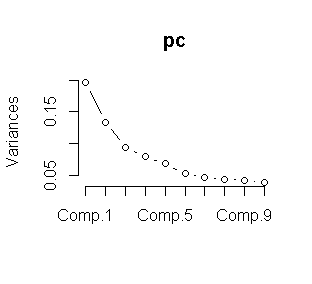
We choose K=5 from the plot. Now we proceed to make the K means clustering.
pc <- princomp(tdm)
plot(pc)
data<-tdm
wss <- (nrow(data)-1)*sum(apply(data,2,var))
for (i in 2:15) wss[i] <- sum(kmeans(data,
centers=i)$withinss)
plot(1:15, wss, type="b", xlab="Number of Clusters",
ylab="Within groups sum of squares")

m3 <- t(tdm2) # transpse from term document matriz
set.seed(1222) # we choose a seed.
k <- 5# number of clusters
kmeansResult <- kmeans(m3, k)
km<-round(kmeansResult$centers, digits = 3)
#we saved in a csv file.
write.csv(km,file="kmeansclinton.csv")
The following loop is for visualize the clusters.
for (i in 1:k) {
cat(paste("cluster ", i, ": ", sep = ""))
s <- sort(kmeansResult$centers[i, ], decreasing = T)
cat(names(s)[1:5], "\n")
}
write.csv(s,file="clusterkm.csv")

Based in the results we can say from each cluster they are the topics most words used in the tweets.

Hi Can yoy share all you script please? I can not do it. Thanks a lot.
I think you miss some line regarding how to create tdm, I guess is about counting the words
Hi Leonardo,
I got the next error:
Error in as.matrix(tdm) : object ‘tdm’ not found
When is ‘tdm’ object initialized in the code? Is a tdm<-XXX sentence missing? I miss something like tdm <- XXX in your code.
Regards and thanks a lot for your article
Tester
Hi, I’d like to know if you have any other thoughts about how to get
SchedulerR to run in r studio 3.3.1. I always get this package is not for this version of r and I’ve tried going backwards with r versions with no luck.
Thank yous
Regards from Venezuela (sorry for the late reply ) If you like I can send you the R version that I used , in 3.3.1 work fine if the os is linux
Hi, unfortunately I don’t run linux so your r version wouldn’t work. Thanks for responding though, I’ll figure something out.
Good job. Thanks!
Greetings Leonardo! I tried to follow up on your instructions but after running OAuth protocol it says
Error in check_twitter_oauth() : OAuth authentication error:
This most likely means that you have incorrectly called setup_twitter_oauth()’
but I’m next to certain that my API is correctly inserted. Could you please give me any advice? Thanks in advance.
Regards Martin , That is a problem for the version in the R packages , I recommended the following link from starkoverflow http://stackoverflow.com/questions/31128492/twitter-setup-twitter-oauth-failing , If continue your problem ask me again !!!
Hello! Could you help to understand with using version of R. Try to do example on version 3.3.2, but when installing package i’ve got a system abort message, that package “SchedulerR” need another version. Could you write which i’ll need to use, or how to install with this version of R? Thanks in advance!!
Regards from Venezuela, I use the R version 3.3.1 (2016-06-21) and for Rstudio version 3.3.1 (2016-06-21). Remember for install the package for os Windows or Linux is different .
Thanks a lot. I’ll try!
Hello Artyom,
I have the same problem; When I type the following:
> install.packages(“SchedulerR”)
I get this:
Warning in install.packages :
package ‘SchedulerR’ is not available (for R version 3.3.2)
I was wondering if you have been able to solve your problem. Please let me know if you have.
Thanks,
Farnaz
how do you R type use for package SchedulerR?